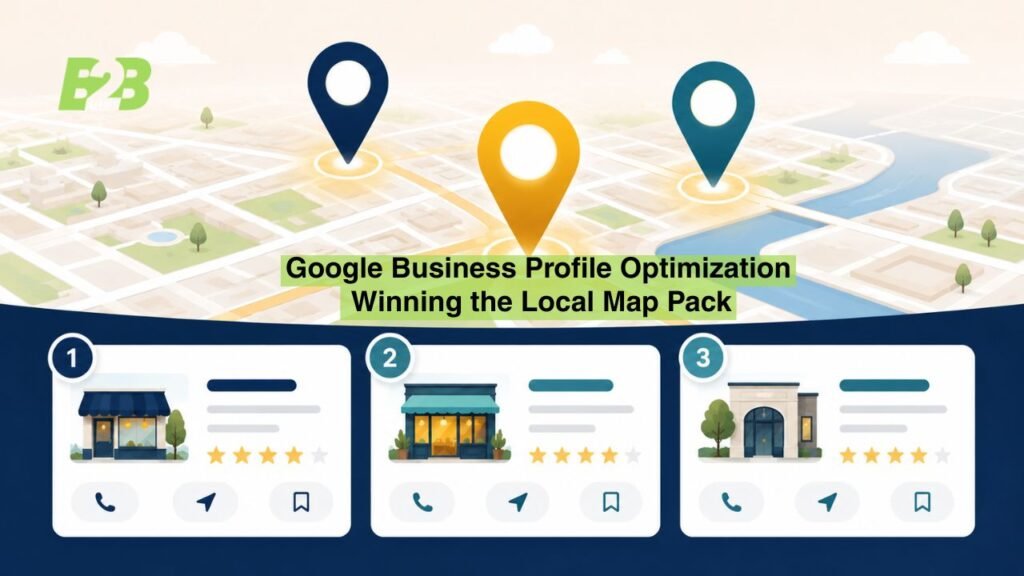
Here’s a number that should stop you mid-scroll: the vast majority of local searches result in a purchase decision within a day — and most of those decisions start with three businesses Google puts in front of the searcher, above every other organic result on the page.
That’s the local pack. Three listings, a map, and whatever information your Google Business Profile (GBP) happens to contain. If your profile is incomplete, outdated, or poorly optimized, you’re not losing a little visibility — you’re handing your next customer directly to a competitor who took the time to get their listing right.
The good news: unlike most of SEO, GBP optimization is almost entirely within your control, it’s free, and you can start improving it today. This guide walks through every step — from claiming your listing to what to do if it gets suspended — so you can build a profile that actually earns its place in the map pack.
What Is Google Business Profile Optimization (and Why It Matters)
Google Business Profile — still called Google My Business by plenty of business owners out of habit — is the free listing that controls how your business appears in Google Search and Google Maps. Optimizing it means completing, refining, and actively managing that listing so Google trusts it enough to show it for relevant local search visibility.
This matters because local search behavior is fundamentally different from general web search. When someone searches “electrician near me” or “personal injury lawyer in [city],” Google isn’t just trying to find the most relevant website — it’s trying to find the most relevant business, right now, near this specific searcher. GBP is the primary data source Google uses to make that call.
local searches
GBP vs. Your Website: Two Different Jobs
Your website and your Google Business Profile do different work, and confusing the two is one of the most common strategic mistakes local businesses make.
- Your website builds long-term authority through content, on-page SEO, and technical SEO — it’s built to rank in traditional organic results and support a broader local SEO strategy.
- Your GBP is built for immediacy — it competes specifically for the Google Maps ranking and local pack / 3-pack, and it’s often the very first thing a searcher sees, before they ever click through to your site.
A beautifully built website with a neglected GBP is a wasted opportunity. Likewise, even a well-optimized listing eventually loses ground without a website that reinforces it. The two need to work together.
How GBP Impacts the Local Map Pack
Google ranks map pack results using a mix of relevance, distance, and prominence. Relevance measures how well your profile matches the search intent behind the query. Distance measures physical proximity to the searcher. Prominence measures how well-known and reputable your business is — driven heavily by reviews, citations, and links.
Every optimization step in this guide feeds one or more of those three factors. Understanding that connection will help you prioritize your time.
Step 1 — Claim and Verify Your Google Business Profile
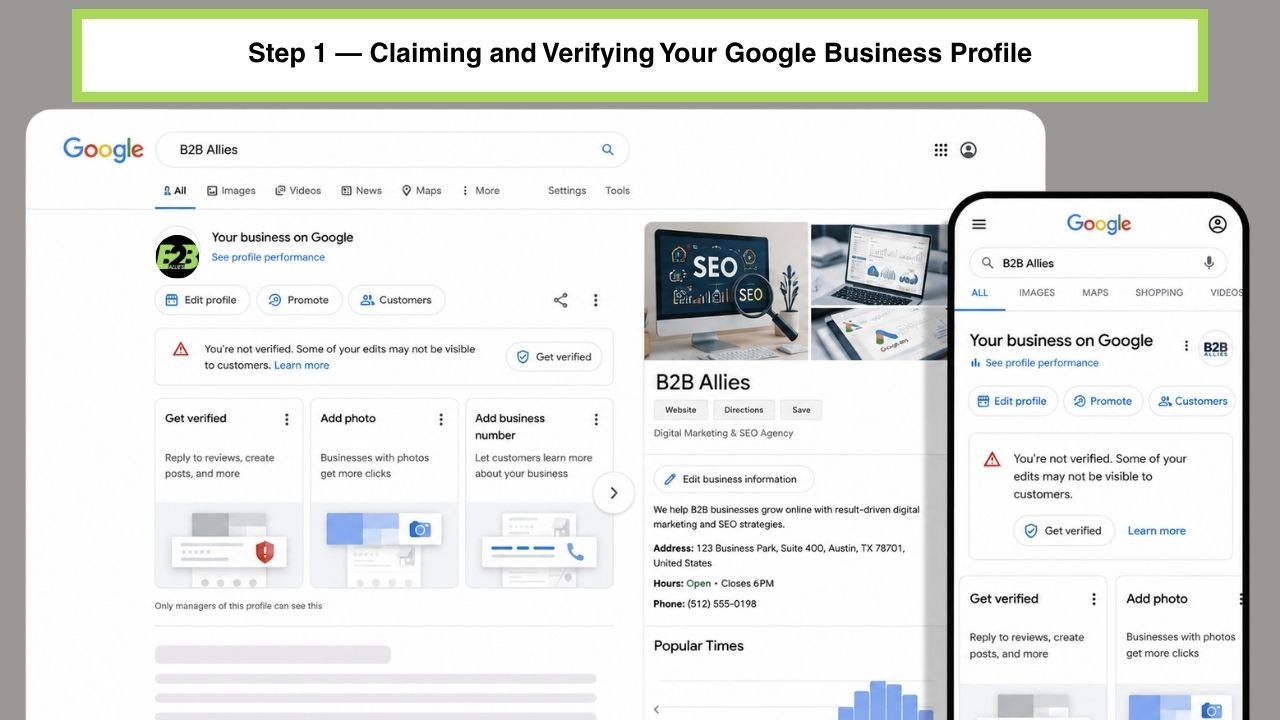
Before you can optimize anything, you need control of the listing. This sounds obvious, but a surprising number of businesses are operating with a listing they don’t actually own.
How to Claim an Existing Listing
Search Google for your business name. If a profile already exists — often created automatically by Google or a data aggregator — you’ll see an option to claim it through the Google Business Profile Manager. If no listing exists yet, you’ll create a new one from scratch, entering your business name, category, location, and contact details.
Verification Methods (Postcard, Phone, Email, Instant)
Google requires verification to confirm you’re the legitimate owner before granting full editing access. Depending on your business type and history, you may be offered:
- Postcard verification — a physical postcard mailed to your business address with a verification code (still the most common method for new listings)
- Phone verification — an automated call or text with a code, when eligible
- Email verification — available for some account types
- Instant verification — automatic for businesses already verified through Google Search Console on the same domain
Postcard verification typically takes one to two weeks, so start this step immediately if you’re setting up a new profile — everything else in this guide depends on having verified, editable access.
What to Do If Your Business Has Duplicate or Conflicting Listings
Duplicate listings are more common than most business owners realize — they show up after a rebrand, a move, a change in ownership, or simply because a data aggregator created a second entry independently of the original. Duplicates actively hurt you: they split your reviews, confuse your NAP consistency, and can suppress your primary listing’s ranking entirely.
To resolve this:
- Search variations of your business name and address to identify every existing listing
- Use Google’s built-in duplicate-reporting flow within Business Profile Manager
- Consolidate reviews where possible, and request removal of the outdated or duplicate profile
- Recheck periodically — duplicates can reappear from third-party data sources even after removal
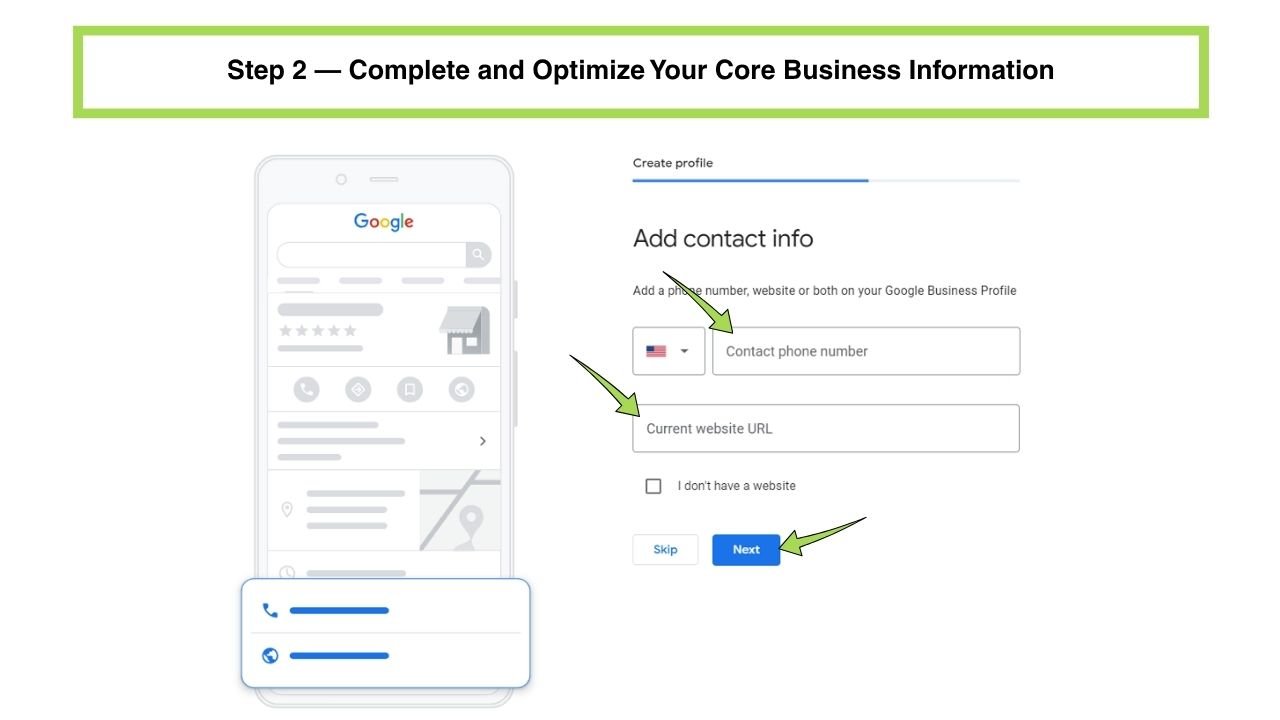
Step 2 — Complete and Optimize Your Core Business Information
Once you have a claimed vs. unclaimed listing resolved in your favor, the real optimization work begins with the fields that make up the backbone of your profile.
Business Name Rules (Avoid Keyword Stuffing and Guideline Violations)
Your business name field should match your real-world signage and legal name exactly — no exceptions. Adding extra keywords (“Angleton’s Best Plumber – ABC Plumbing”) might seem like a shortcut to ranking, but it directly violates Google Business Profile guidelines and is one of the fastest ways to trigger a suspension. Let your category and description fields do the keyword work instead.
Choosing the Right Primary and Secondary Categories
Categories are one of the most heavily weighted Google Maps ranking factors, and they’re also one of the most commonly mismanaged. Your primary category should describe your core business as specifically as possible — “Plumber” rather than the broader “Contractor,” for example. Add relevant secondary categories to capture related services, but avoid adding categories that don’t genuinely apply; irrelevant categories dilute relevance rather than expanding it.
NAP Consistency: Matching Your Address, Phone, and Website Everywhere
NAP consistency — your Name, Address, and Phone number matching exactly across your GBP, website, and every local directory where you’re listed — is a foundational trust signal. Even small inconsistencies (a missing suite number, “St.” vs. “Street,” a disconnected phone line) can quietly undermine your credibility with Google’s algorithm. Run a NAP audit across your major citation sources at least once a year, and every time your business information changes.
Service Areas vs. Physical Storefront Settings
If customers visit you at a physical location, configure your profile as a storefront business with a visible address. If you travel to customers instead — a classic service-area business like a plumber, HVAC technician, or mobile detailer — hide your address and define your service area by city or radius instead. Getting this setting wrong is a common and costly mistake: a storefront-style listing for a business that doesn’t actually welcome walk-ins misleads customers and can trigger guideline issues.
Business Hours, Special Hours, and Holiday Updates
Keep standard business hours accurate and update special hours for holidays, weather closures, and one-off schedule changes. Incorrect hours are a top driver of negative customer experiences — and a frequent, avoidable source of poor reviews.
Step 3 — Write a Business Description That Ranks and Converts
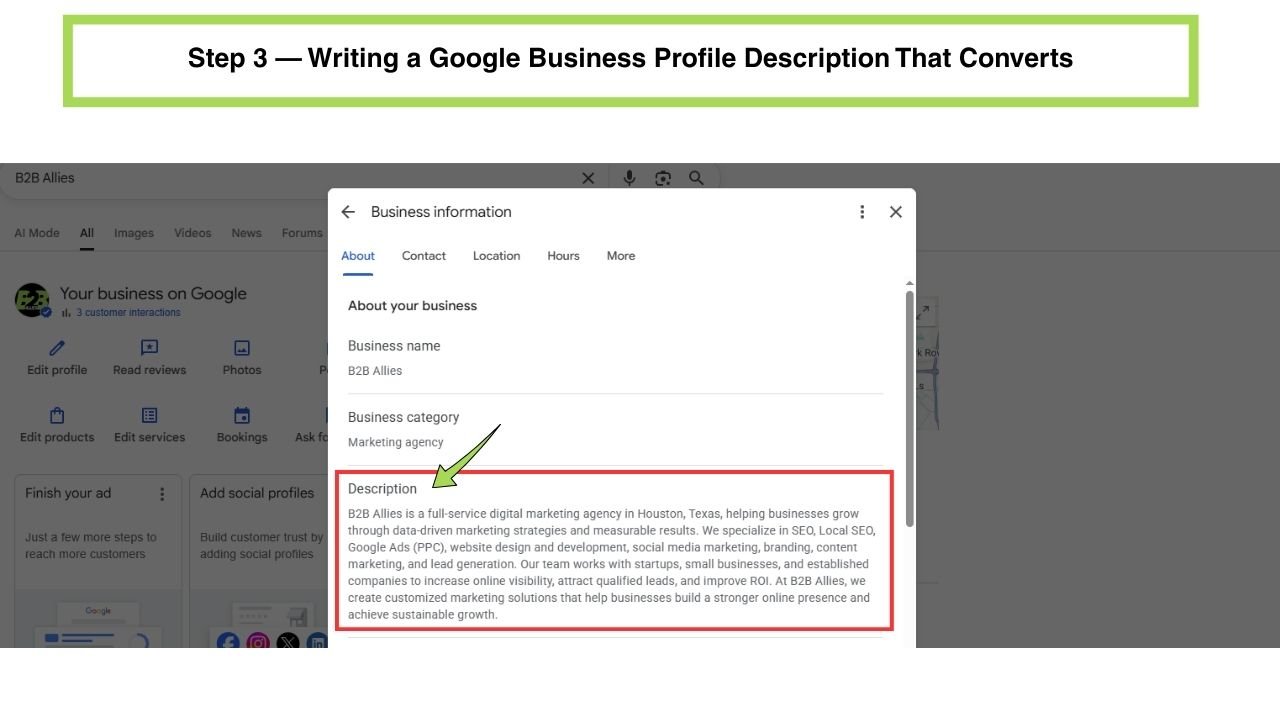
Your business description is one of the few places on your profile where you can speak directly and persuasively to potential customers, while still reinforcing relevant search terms.
What to Include (and What Google Prohibits)
A strong description covers what you do, who you serve, what makes you different, and any credentials or history worth mentioning. Google explicitly prohibits marketing taglines, promotional language (“best in town,” discount codes), URLs, and unverified claims — keep the tone factual and informative rather than promotional.
Matching Description Language to Real Search Behavior
Write the way your customers actually search, not the way your industry talks internally. A plumbing company might naturally describe itself as “residential and commercial plumbing services,” matching real search phrasing, rather than internal jargon a customer would never type into Google.
Step 4 — Use Photos, Videos, and Attributes Strategically
Visual content isn’t decorative on a Google Business Profile — it directly influences both click-through rate and Google’s confidence that your listing is active and legitimate.
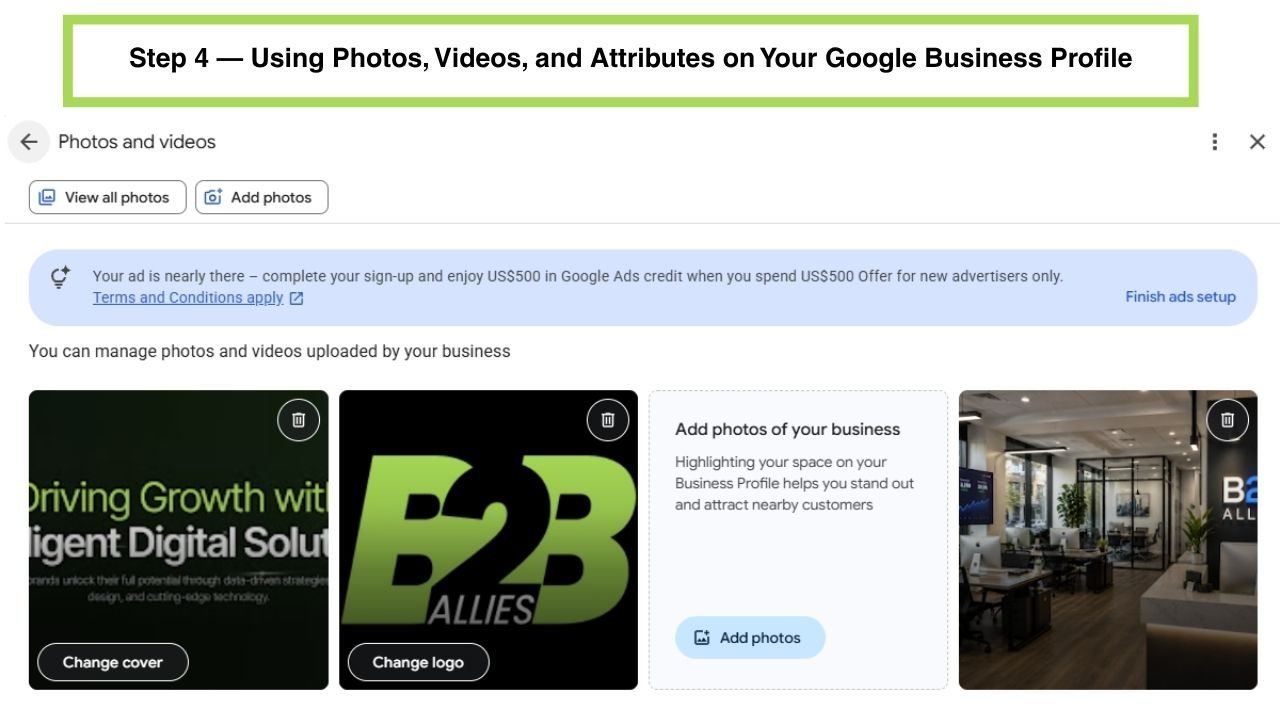
Photo Types That Perform Best (Exterior, Interior, Team, Product/Service)
A well-rounded photo set includes:
- Exterior shots — help customers recognize your location and confirm they’ve arrived at the right place
- Interior shots — build trust before a first visit
- Team photos — add a human, credible element, especially valuable for service businesses and healthcare providers
- Product or service-in-action photos — directly demonstrate what a customer can expect
Use geo-tagged photos where possible, and update your photo library regularly rather than uploading once and forgetting it.
Videos and Virtual Tours
Short videos and a virtual tour add another layer of trust and engagement, particularly for businesses where the physical space matters to the buying decision — restaurants, medical offices, retail showrooms, and real estate offices.
Attributes That Build Trust (Accessibility, Amenities, Payment Options)
Attributes let you flag specifics like wheelchair accessibility, free Wi-Fi, outdoor seating, or accepted payment methods. These details rarely make or break a ranking on their own, but they materially affect conversion — a customer choosing between two similarly-ranked businesses often picks the one with more complete, reassuring detail.
Step 5 — Turn Reviews Into a Ranking Signal
Online reviews aren’t just social proof — they’re a measurable input into your Google Maps ranking, and one of the most persuasive elements on your entire profile.
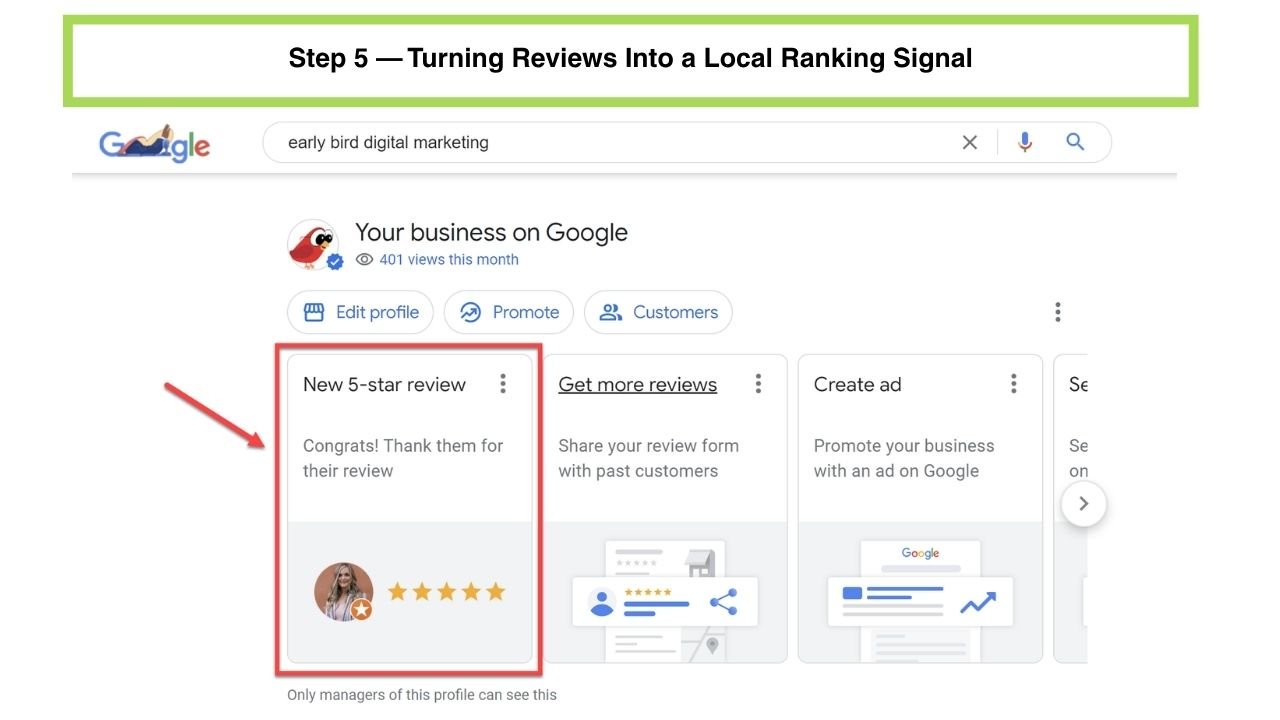
How to Ethically Generate More Reviews
Ask satisfied customers directly, at the moment satisfaction is highest — right after a completed job, a successful appointment, or a positive interaction. Make it easy with a direct review link. Never offer incentives in exchange for reviews; this violates Google’s policies and puts your entire profile at risk.
Writing Review Responses That Reinforce Keywords
Review responses are an underused opportunity. A thoughtful, specific reply — naturally mentioning the service provided and your location — reinforces relevance signals far more effectively than a generic “Thanks for the review!” Genuine, detailed responses also demonstrate active reputation management to anyone reading your profile.
Handling Negative Reviews Without Violating Google’s Policies
Respond calmly, factually, and professionally to every negative review — never dispute a customer publicly or offer compensation in the response itself. You can flag reviews that violate Google’s policies (fake reviews, spam, conflicts of interest) for removal, but a genuine negative review from a real customer generally has to stand; how you respond to it matters more than the review itself.
Step 6 — Use Google Posts, Q&A, and Messaging
Beyond the static fields, GBP includes several engagement tools that most businesses underuse — and that directly signal to Google that your profile is active.
Posting Cadence and Content Types (Offers, Updates, Events)
Google Posts function similarly to social media updates directly inside your listing — announcements, promotions, events, and general updates. Posting consistently, even weekly, signals an actively managed profile and gives you another place to naturally reflect your services and location.
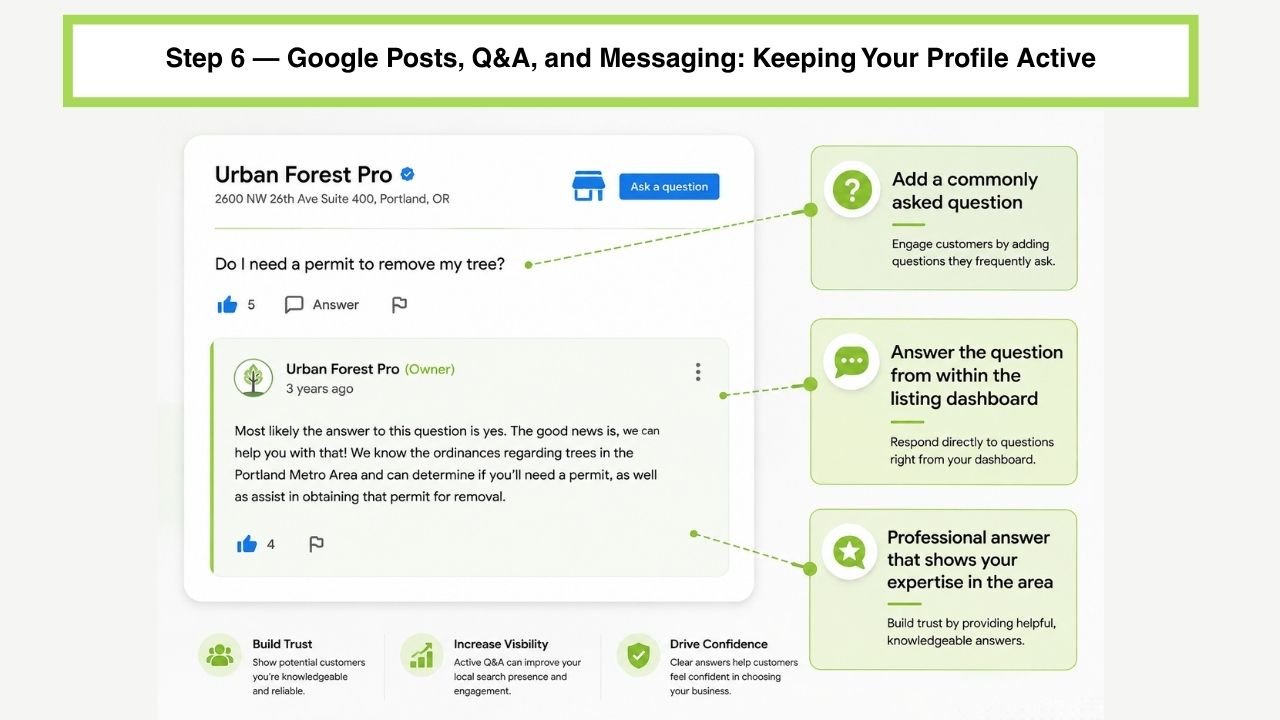
Managing the Q&A Section Proactively
The Q&A section is publicly editable, meaning anyone can post a question — or an answer. Don’t leave this to chance: seed it with the questions customers actually ask, and answer them yourself with clear, accurate information before an unmonitored answer does it for you.
Enabling and Monitoring Direct Messaging
Direct messaging lets customers reach you straight from your profile before they’ve even visited your site. Enable it only if you can respond promptly — an ignored message thread creates a worse impression than no messaging option at all.
Step 7 — Build Citations and Off-Page Local Signals
Optimization doesn’t stop at your own profile. Google also weighs how consistently your business is represented across the rest of the web.
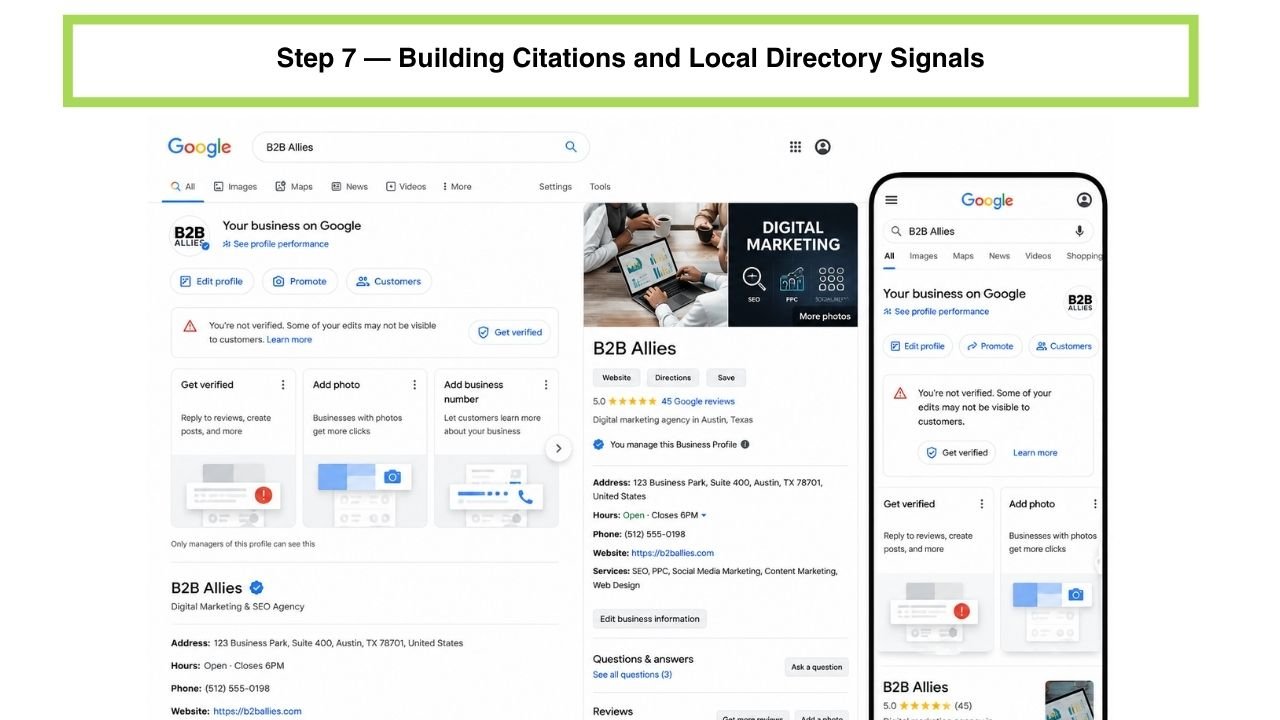
What Citations Are and Why They Reinforce GBP Trust
Citations are mentions of your business name, address, and phone number on other websites — directories, industry associations, local news, chambers of commerce. Consistent citations reinforce that your business is real, established, and accurately represented, directly supporting the “prominence” factor in Google’s ranking calculation.
Industry-Specific and Local Directories Worth Prioritizing
Beyond general directories, prioritize listings relevant to your specific industry and region — a local directory for Gulf Coast contractors will carry more relevance than a generic national listing site for a home services business. Pair citation building with a broader backlink profile strategy and proper schema markup (Local Business schema) on your website for a fully reinforced local signal set.
Step 8 — Track Performance and Keep Optimizing
GBP optimization isn’t a one-time project — it’s an ongoing discipline, and measuring results is what separates businesses that improve from those that plateau.
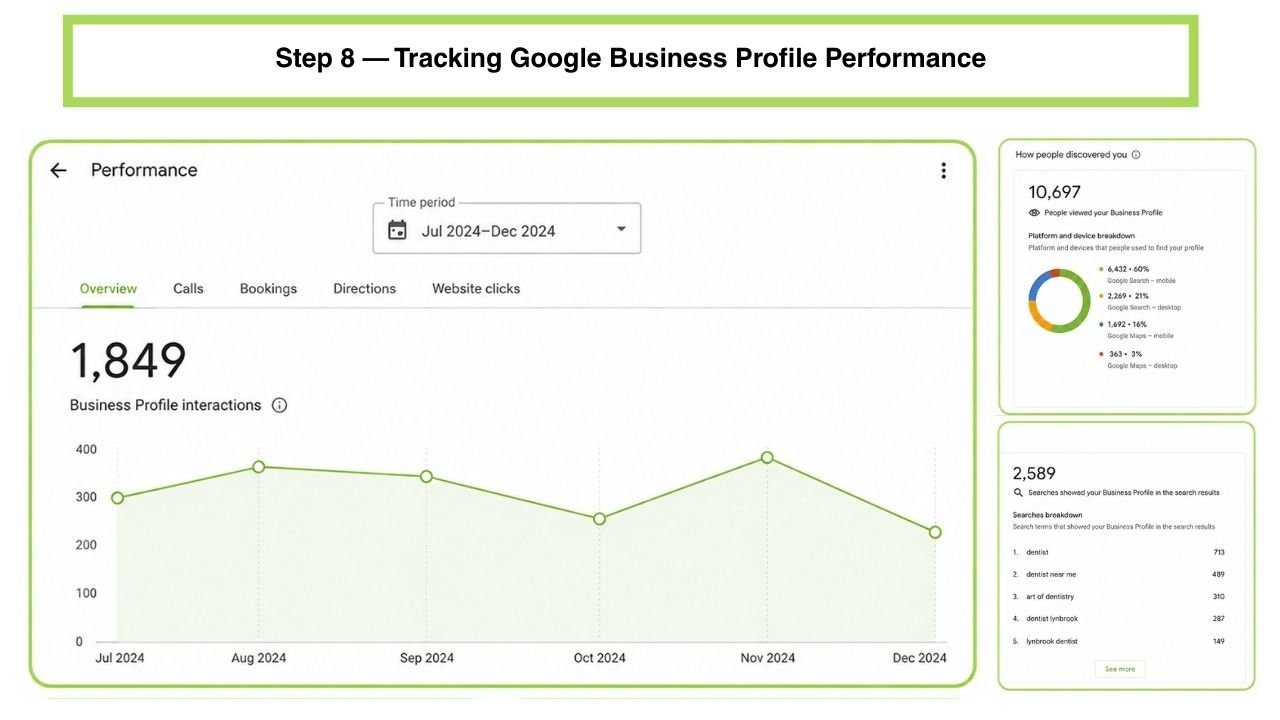
Reading GBP Insights (Calls, Direction Requests, Website Clicks)
GBP Insights shows how customers are finding and interacting with your listing — search queries, phone calls, direction requests, and website clicks. Review this data monthly to spot trends, identify which categories or posts are driving engagement, and catch problems early.
Connecting GBP Data to Google Search Console and GA4
For a complete picture, pair GBP Insights with Google Search Console and GA4 (Google Analytics 4). Search Console shows how your website performs in traditional organic search; GA4 tracks what happens after a visitor lands on your site — including organic traffic sources and conversion rate by channel. Call tracking tools can close the loop further, attributing phone leads specifically back to your GBP listing.
How Often You Should Audit and Update Your Profile
Set a recurring schedule: a light monthly check of hours, posts, and new reviews, and a deeper quarterly audit of categories, photos, description, and citation consistency. Profiles that sit untouched for months tend to lose ground to competitors actively managing theirs.
Common Google Business Profile Mistakes That Hurt Rankings
Even well-intentioned business owners make avoidable errors. Watch for these:
- Keyword stuffing in business name — a direct guideline violation and a common suspension trigger
- Inconsistent NAP consistency across the website, GBP, and directories
- Leaving the service-area business setting misconfigured for a business with no walk-in storefront
- Ignoring the Q&A section, allowing incorrect or outdated answers to sit unaddressed
- Uploading photos once and never updating them
- Responding to negative reviews defensively or publicly disputing customers
- Choosing an overly broad primary category instead of the most specific accurate option
- Letting special hours go unupdated around holidays, leading to poor customer experiences and negative reviews
What to Do If Your GBP Listing Is Suspended or Disabled
A suspended listing can feel like your business vanished from Google overnight — and for many owners, it’s the most stressful part of managing a GBP.
Common triggers include:
- Keyword-stuffed or non-compliant business names
- Address mismatches between your GBP and real-world signage
- Suspected spam activity, such as multiple listings for a single location
- Sudden, unusual changes to business information that trigger automated review
- Reports filed by competitors or users, valid or not
Steps to recover:
- Review Google’s Google Business Profile guidelines carefully to identify the likely guideline violation
- Correct the underlying issue — fix the name, confirm the address, remove duplicate listings
- Submit a reinstatement request through Business Profile Manager, explaining the correction clearly
- Be patient — reinstatement can take days to several weeks, and resubmitting too aggressively can slow the process further
Prevention is far easier than recovery: strict adherence to naming rules, accurate address information, and avoiding any tactic that resembles spam listings will keep you clear of most suspension triggers in the first place.
Google Business Profile Optimization by Industry
GBP optimization isn’t one-size-fits-all — the details that matter most shift by industry.
- Home services (plumbing, HVAC, roofing): prioritize service-area configuration, emergency-hours accuracy, and before/after project photos
- Healthcare/medical practices: accurate hours, provider-specific attributes, and careful, compliant review response language
- Legal services: precise category selection (practice area matters enormously), credential-focused descriptions, and consistent citations across legal directories
- Retail/e-commerce: strong photo galleries, accurate storefront hours, and Google Posts highlighting inventory or promotions
- Industrial & oilfield suppliers: category precision for B2B search behavior, detailed service descriptions matching longer research cycles, and citations on industry-specific directories
- Real estate: agent- or office-level profiles, active Q&A management, and virtual tour content
- Restaurants: menu accuracy, frequent photo updates, and fast, specific review responses
- Multi-location businesses and franchise SEO: consistent branding across every location profile, paired with a centralized process for updates, citations, and review monitoring at scale
Frequently Asked Questions
Is Google Business Profile free?
How long does it take for GBP optimization to improve rankings?
Can I change my business category later?
Do Google Posts actually affect rankings?
What's the difference between Google Business Profile and Google Maps?
Can I have more than one Google Business Profile for the same business?
Does responding to reviews really help SEO?
Google Business Profile Optimization Checklist
Use this as a quick self-audit, whether you’re starting from scratch or refreshing an existing listing:
- [ ] Claim and verify your listing through Google Business Profile Manager
- [ ] Check for and resolve any duplicate listings
- [ ] Confirm business name matches signage exactly — no keyword stuffing
- [ ] Select the most specific accurate primary category, plus relevant secondary categories
- [ ] Audit NAP consistency across your website and directories
- [ ] Set service-area vs. storefront configuration correctly
- [ ] Update business hours and set special hours for upcoming holidays
- [ ] Write a clear, compliant business description
- [ ] Upload a well-rounded, regularly refreshed photo library
- [ ] Add relevant attributes
- [ ] Set up a consistent review generation process
- [ ] Respond to every review, positive and negative
- [ ] Post to Google Posts on a regular cadence
- [ ] Seed and monitor the Q&A section
- [ ] Build citations on relevant local and industry directories
- [ ] Review GBP Insights monthly and cross-reference with GA4/Search Console
- [ ] Schedule a deeper quarterly audit of the full profile
Want Your Google Business Profile Managed for You?
Everything in this guide works — but it also takes real, ongoing time to do well. Between claiming listings, resolving duplicates, generating reviews, posting consistently, and monitoring performance data, GBP management quietly becomes a part-time job for a lot of business owners.
If you’d rather hand it off, B2B Allies manages Google Business Profile optimization as part of a broader local SEO strategy for businesses across Angleton, the Texas Gulf Coast, and the greater Houston area.
Request a free GBP audit and we’ll show you exactly where your profile stands today, and what it would take to get it performing.